
Troubleshooting Common Issues on the SMJ-552 Photo Booth
- Troubleshooting Common Issues on the Automatic Self-Service Photo Booth SMJ-552
- Introduction: Why a clear troubleshooting path matters for your photo booth machine
- First priorities: Quick checklist before deep troubleshooting
- Power and hardware issues — get the SMJ-552 back online
- Camera and image-quality problems — fix blurry, dark, or misframed photos
- Touchscreen and user interface (UI) problems — when the screen doesn’t respond
- Printing and sharing failures — when guests can’t get prints or digital copies
- Network, uploads, and remote access — keep the SMJ-552 connected
- Software crashes, freezes, and update management
- Lighting and environmental issues — optimize photo quality in any venue
- Maintenance schedule and cleaning best practices
- Preventive measures to minimize on-site failures
- When to contact technical support — clear escalation criteria
- Brand advantages: Why choose the SMJ-552 photo booth machine
- FAQ — Frequently Asked Questions about troubleshooting the SMJ-552
- Contact support / View product
- Authoritative references and further reading
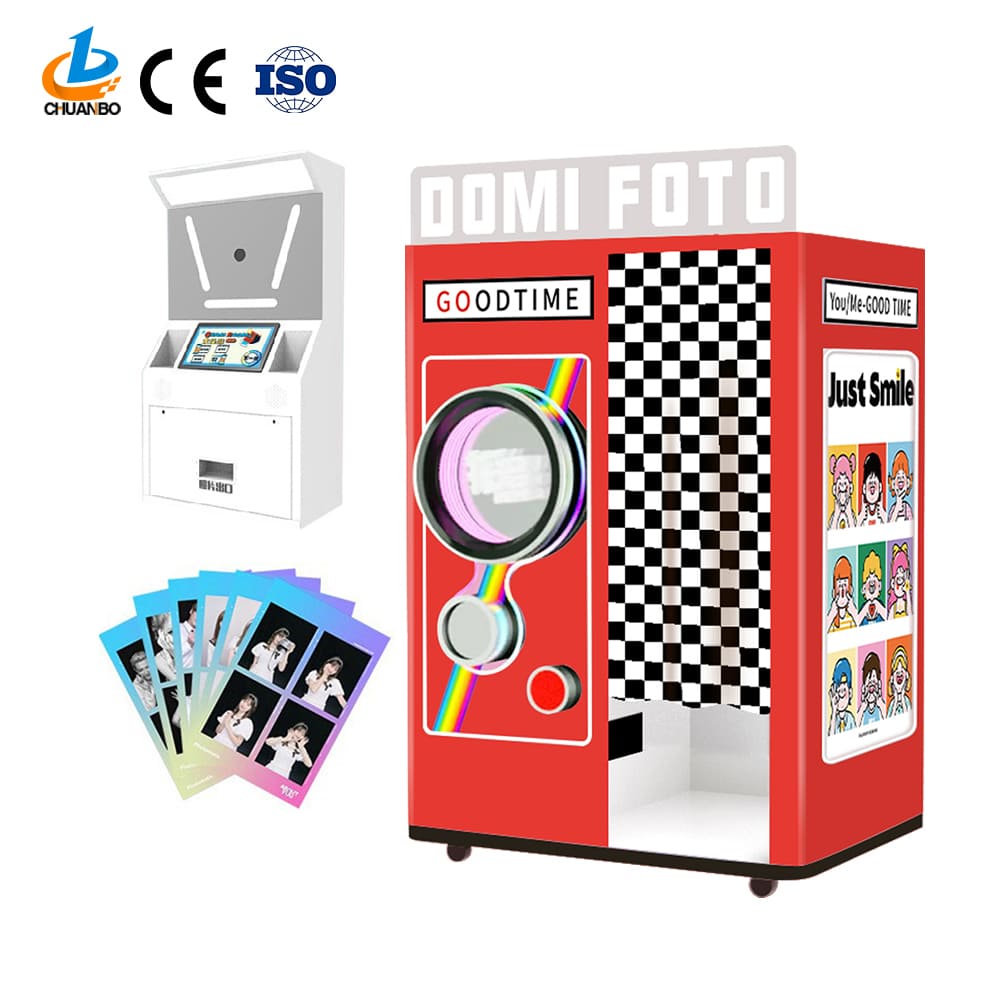
Troubleshooting Common Issues on the Automatic Self-Service Photo Booth SMJ-552
Introduction: Why a clear troubleshooting path matters for your photo booth machine
The Automatic Self-Service Photo Booth SMJ-552 is designed to deliver a fully digital, attendee-friendly experience that eliminates the need for an attendant. Even with robust design and tested software, any photo booth machine can encounter issues in daily operation—especially at high-traffic events. This guide gives operators step-by-step diagnostic checks, quick fixes, and preventive measures to resolve the most common SMJ-552 problems quickly and reliably.
First priorities: Quick checklist before deep troubleshooting
Before diving into technical fixes, run this rapid checklist to identify the scope of the problem. These checks capture the majority of simple, fixable issues without tools or technical access:
- Power: Is the unit visibly powered and are any front LEDs lit?
- Reboot: Have you tried a soft restart (power cycle) of the SMJ-552?
- User reports: Is the issue reproducible (always occurs) or intermittent?
- Environment: Is the booth placed in direct sunlight, near heat sources, or a high humidity area?
- Network: If uploading or remote control is failing, confirm Wi‑Fi or Ethernet is connected.
Power and hardware issues — get the SMJ-552 back online
Symptoms: unit won't power on, intermittent shutdowns, strange LEDs, or device not booting fully.
Troubleshooting steps:
- Check AC connection: Confirm the AC power cord is fully seated at both the booth and the outlet. If using an extension or power strip, try a direct wall outlet.
- Inspect the fuse/circuit: If available, check the internal fuse or external circuit breaker. Replace user-replaceable fuses with the same rating only.
- Soft restart: Power down, wait 30 seconds, then power up. A full cycle clears many transient issues.
- Battery/UPS: If your deployment uses UPS for clean shutdowns, confirm the UPS is charged and functional.
- Temperature and ventilation: Overheating can cause shutdowns. Verify ventilation openings are not blocked and room temperature is within operating range.
If the SMJ-552 refuses to boot after these steps, collect visible LED indicators and any displayed error codes before contacting support.
Camera and image-quality problems — fix blurry, dark, or misframed photos
Symptoms: images are out of focus, overexposed/underexposed, wrong framing, or lens obstructions.
Diagnostic and corrective steps:
- Clean the lens: Use a microfiber cloth and camera-safe cleaner. Fingerprints and dust are common causes of poor images.
- Auto-focus confirmation: Ensure the camera module's autofocus setting is enabled in the SMJ-552 settings menu. If using fixed-focus, place the subject within the recommended distance range.
- Lighting adjustments: Check ambient and onboard lighting. If images are dark, increase booth LED intensity or add diffused fill lights. For overexposure, reduce direct light or adjust camera exposure compensation.
- Framing and alignment: Verify the camera mount is secure. Minor knocks during transport can misalign the camera. Realign per the setup guide or use the live preview to center framing.
- Firmware and drivers: Ensure the camera firmware and the SMJ-552 imaging drivers are up-to-date; outdated firmware can degrade image processing performance.
Touchscreen and user interface (UI) problems — when the screen doesn’t respond
Symptoms: unresponsive touch, mis-touches, frozen UI, or touch calibration drift.
Steps to resolve:
- Surface cleaning: Wipe the screen with a non-abrasive microfiber cloth to remove oils or residues that interfere with capacitive touch.
- Reboot the system: Many UI freezes resolve with a soft restart of the SMJ-552.
- Check for screen protectors: If a third-party protector was applied, it may impede sensitivity. Remove and test.
- Calibration test: Use the built-in calibration utility in the settings menu to recalibrate the touchscreen.
- External input: If urgent, provide an external keyboard or connect a wired remote to proceed while diagnosing the touchscreen fault.
Printing and sharing failures — when guests can’t get prints or digital copies
Note: The SMJ-552 is primarily a digital selfie station, but many operators integrate on-site printers or social sharing services. Typical issues include print jams, failed uploads, or sharing errors.
Troubleshooting:
- Printer jams: Power off the printer, gently clear jammed paper following the printer manufacturer’s instructions, then power on. Use correct paper stock and thermal paper if the printer requires it.
- Connectivity: Ensure the printer or sharing service is properly connected over USB, Bluetooth, or network. Re-pair or reassign the device in the SMJ-552 settings.
- Cloud upload failures: Confirm network access and check API keys or credentials for sharing platforms (email, MMS, or social integrations). Re-enter tokens if necessary.
- Storage limits: If the booth stores temporary images locally, verify free disk space. Clean old sessions periodically or enable automatic purging.
Network, uploads, and remote access — keep the SMJ-552 connected
Symptoms: failed uploads, slow transfers, remote-management disconnects, or inability to stream live previews.
How to diagnose and fix:
- Connection type: Confirm whether the booth uses Wi‑Fi or Ethernet. Ethernet is more reliable for events—prefer it where available.
- Signal strength: For Wi‑Fi, check RSSI/signal strength. If weak, move the unit closer to the access point or use a dedicated event router with less congestion.
- Network policies: Some venue networks block ports or restrict traffic. For stable uploads, use a mobile hotspot or request IT to open required ports and allow outbound HTTPS traffic for your sharing services.
- Upload queue: Check for queued jobs in the SMJ-552 upload manager. Large simultaneous uploads may require bandwidth throttling; configure rate limits where possible.
- Certificate errors: If HTTPS uploads fail after network changes, verify system time/date and TLS certificates on the SMJ-552 are valid.
Software crashes, freezes, and update management
Symptoms: application crashes, unexpected restarts, features missing after updates, or custom skins not applying.
Best practices and fixes:
- Safe update process: Schedule a maintenance window to update the SMJ-552 firmware and application software. Ensure power stability during updates.
- Roll back if needed: Keep the prior stable build available in case the latest update introduces regressions. Test updates on a single unit before fleet rollout.
- Check logs: Use the system logs to identify exception traces. Many problems are reproducible and logged; share logs with vendor support when needed.
- Third-party plugins: Disable newly added plugins or custom modules to isolate the cause of crashes.
Lighting and environmental issues — optimize photo quality in any venue
Symptoms: harsh shadows, inconsistent skin tones, or photos ruined by sunlight or reflections.
Guidance:
- Use diffused lighting: Softboxes or ring LEDs produce flattering, consistent illumination. Avoid undiffused spotlights that create sharp shadows.
- Control ambient light: Position the SMJ-552 away from direct sunlight or reflective surfaces. If outdoors, use a canopy or tent to stabilize lighting conditions.
- Color balance: If photos look too warm or cool, set the camera white balance to 'Auto' or choose presets matching the venue light source (tungsten, fluorescent, daylight).
Maintenance schedule and cleaning best practices
Regular maintenance reduces downtime. Implement this simple schedule:
| Task | Frequency | Why it matters |
|---|---|---|
| Lens and screen cleaning | Daily (high-use events) / Weekly (regular use) | Restores image clarity and touchscreen responsiveness |
| Software updates and backups | Monthly or as-released | Security patches and feature stability |
| Storage cleanup (logs/photos) | Monthly | Prevents disk-full errors and improves performance |
| Physical inspection (mounts, cables) | Before each deployment | Prevents alignment and connection failures |
Preventive measures to minimize on-site failures
Preparation reduces the probability of failures during events. Recommended preventive steps:
- Pre-event checklist: test boot, camera, touch, sharing, and printing in the event location (or a close simulation) at least 24 hours prior.
- Spare parts kit: carry extra power cables, fuses, an external hotspot, a small cleaning kit, and basic tools for alignment.
- Remote monitoring: enable remote logging and notifications so you can receive alerts for low disk space, failed uploads, or system errors during an event.
- Operator training: train venue staff on quick resets, paper replacement, and cleaning so small issues can be resolved without technical support.
When to contact technical support — clear escalation criteria
Contact support when:
- Power cycling and basic checks fail to restore normal operation.
- Hardware fault indicators (smoke, burning smell, or molten plastic) are present — power down immediately and contact certified technicians.
- Persistent camera sensor issues after cleaning and driver updates.
- Software exceptions persist after rollback to a stable build.
When contacting support, have the following information ready: model (Automatic Self-Service Photo Booth SMJ-552), serial number, firmware version, log files, a clear description of the symptom, and steps already taken.
Brand advantages: Why choose the SMJ-552 photo booth machine
The Automatic Self-Service Photo Booth SMJ-552 is built for operators who need a reliable, low-touch selfie station for parties, brand activations, and venues. Key advantages:
- Fully digital, attendant-free operation optimizes labor costs and scales easily for events.
- User-centric UI simplifies guest flow, lowering support calls and training overhead.
- Modular hardware and software design eases repairs and updates, shortening time-to-fix.
- Designed for portability and quick setup—ideal for pop-up activations and touring events.
- Integrates with social-sharing platforms and on-site peripherals (printers, kiosks) to deliver both digital and physical keepsakes.
FAQ — Frequently Asked Questions about troubleshooting the SMJ-552
Q: The SMJ-552 won’t power on. What’s the first thing I should try?
A: Confirm the AC cable is seated and test an alternate wall outlet. Then perform a soft restart (power off, wait 30 seconds, power on). If still dead, check for blown fuses, and contact support with the unit’s serial number.
Q: Images are blurry even after cleaning the lens. What else might cause this?
A: Check that autofocus is enabled and that the subject stands in the recommended distance range. Verify that the camera mount hasn’t shifted; if it has, realign the camera using the live preview. Update camera firmware if available.
Q: Prints are jammed — can I clear the jam myself?
A: Yes. Power off the printer, gently remove jammed paper following the printer manual, check rollers for residue, and use manufacturer-approved paper. If the jam recurs, inspect for torn paper pieces or damaged rollers and replace parts as needed.
Q: Uploads to social media are failing at the venue Wi‑Fi. What should I do?
A: Try a wired Ethernet connection or mobile hotspot. Confirm venue network doesn’t block required ports or outbound HTTPS. If the issue is bandwidth, enable upload queueing or throttling in the SMJ-552 settings.
Q: How often should I update software on the SMJ-552?
A: Apply security and critical updates as released. For feature releases, test on a single unit before fleet deployment and schedule updates during maintenance windows to avoid disrupting events.
Contact support / View product
If you need direct assistance with your Automatic Self-Service Photo Booth SMJ-552, contact our support team or view full product details and documentation on the product page: View SMJ-552 Product Page. For urgent issues, prepare the unit serial number, firmware version, and any log files before contacting support.
Authoritative references and further reading
These references provide additional context on kiosks, photobooths, and safety/industry best practices:
- Photobooth — Wikipedia: https://en.wikipedia.org/wiki/Photobooth
- Kiosk Industry Association — technical and deployment guidance: https://www.kioskindustry.org/
- National Automatic Merchandising Association (NAMA) — vending & self-service industry resources: https://www.nama.org/
- Underwriters Laboratories (UL) — product safety standards: https://www.ul.com/
Implementing the steps in this guide will resolve most common problems you’ll encounter with the photo booth machine SMJ-552 and help you maintain reliable, repeatable performance at events. When in doubt, document the symptom, reproduce it if possible, and contact support with logs and photographic evidence to expedite resolution.
Understanding Cotton Candy Vending Machine Costs | Chuanbo
OEM/ODM cotton candy vending machine cost Manufacturers and Suppliers
Best Places to Put Vending Machines for Maximum Profit – Chuanbo
Cost of Starting a DIY Phone Case Vending Machine Business in the UK - Chuanbo
About products
Are you a trade or a factory?
Our company is the professional manufacturer in Panyu, Guangzhou, China. And you are warmly welcome to visit our factory anytime.
Can I buy samples?
Yes. Please feel free to contact us.
About customized services
How to ensure the quality of customized products?
We implement a strict quality management system, and all products undergo multiple testing processes to ensure that they meet high-quality standards.
How long does it take to produce a custom cotton candy machine?
The production timeline depends on the level of customization and order volume. Typically, our lead time is between 15 and 30 days. We’ll provide a detailed timeline after understanding your specifications and needs.
Do you provide warranty and after-sales support for custom machines?
Yes, all our custom cotton candy machines come with a one-year warranty covering parts and repairs. Additionally, our support team is available to help with maintenance and troubleshooting beyond the warranty period, ensuring long-term satisfaction.
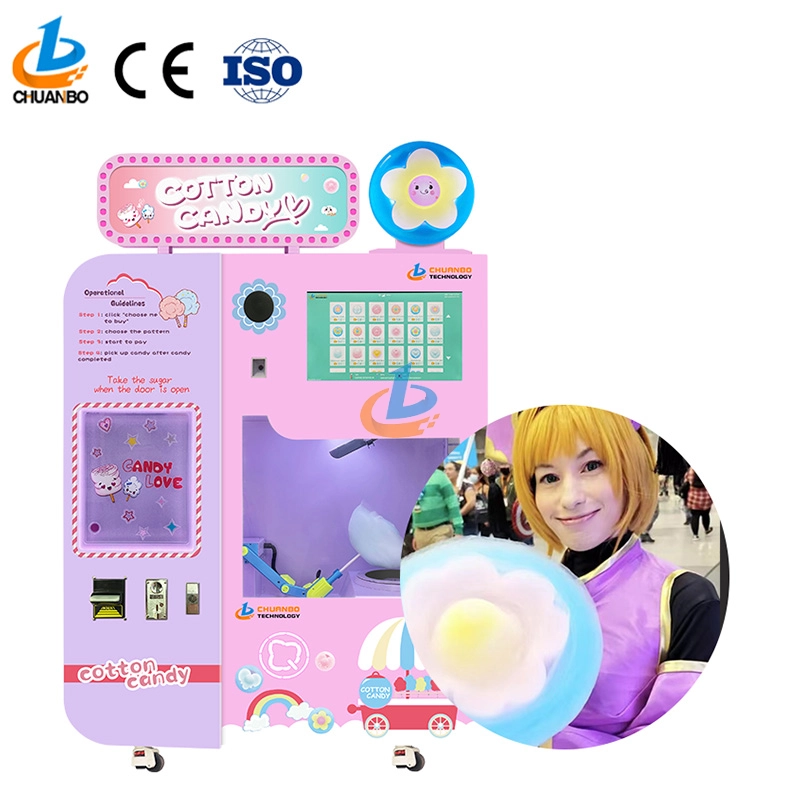
Fully Automatic Cotton Candy Vending Machine CB328
Introducing the Chuanbo Fully Automatic Cotton Candy Vending Machine CB328—a perfect blend of innovation and convenience. Ideal for businesses, this vending machine offers an effortless way to enjoy fresh cotton candy anytime. Explore the automatic cotton candy vending machine for sale and elevate your location's snack options today.
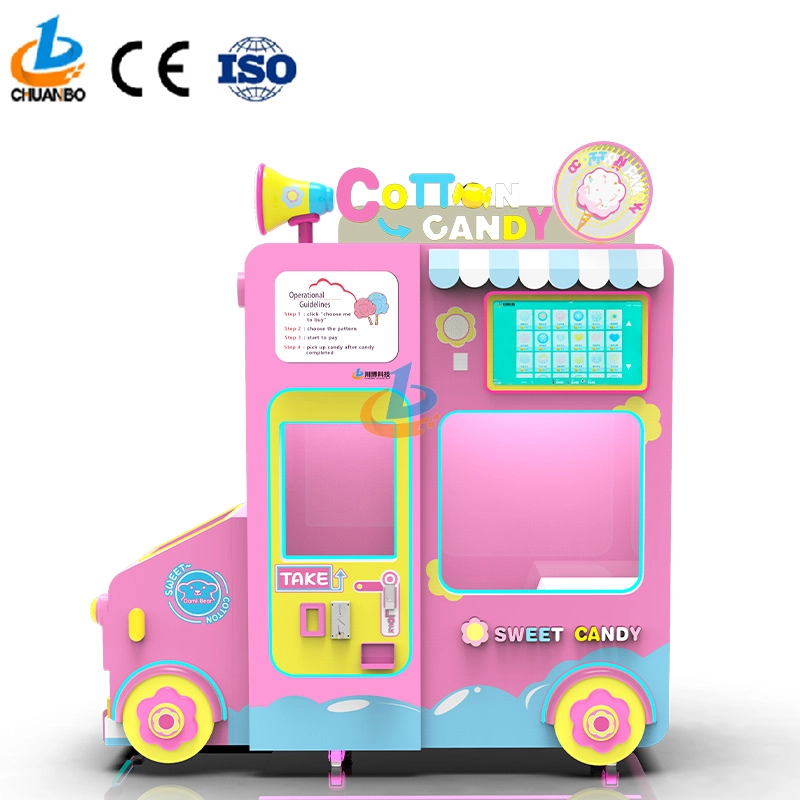
Intelligent Flower Candy Floss Vending Machine CB730
This automated candy floss vending machine combines advanced automation technology with the timeless appeal of cotton candy. Its robotic arms precisely transform sugar into fluffy treats and mold them into delightful shapes, such as flowers, hearts, and more. Customers can select the cotton candy they want by their preferences, ensuring that each dessert is both delicious and visually appealing.
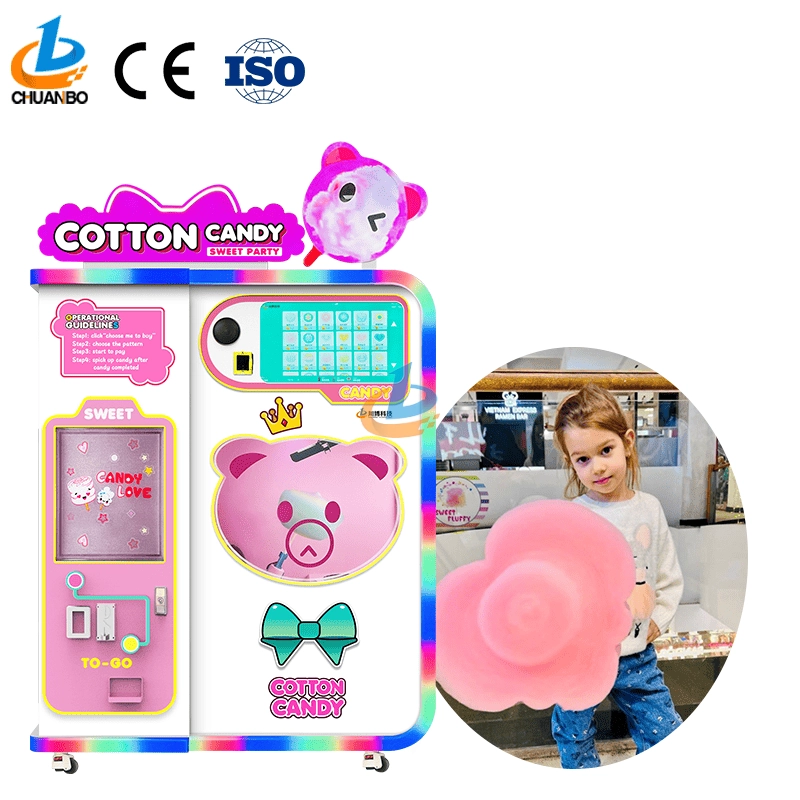
Fully Automatic Cotton Candy Vending Machine CB525
Discover the Chuanbo Fully Automatic Cotton Candy Vending Machine CB525, the ultimate solution for hassle-free confectionery delight. Ideal for entrepreneurs and venues, this high-efficiency machine ensures consistent quality. Explore our fully automatic cotton candy vending machine for sale today and elevate your business offerings.
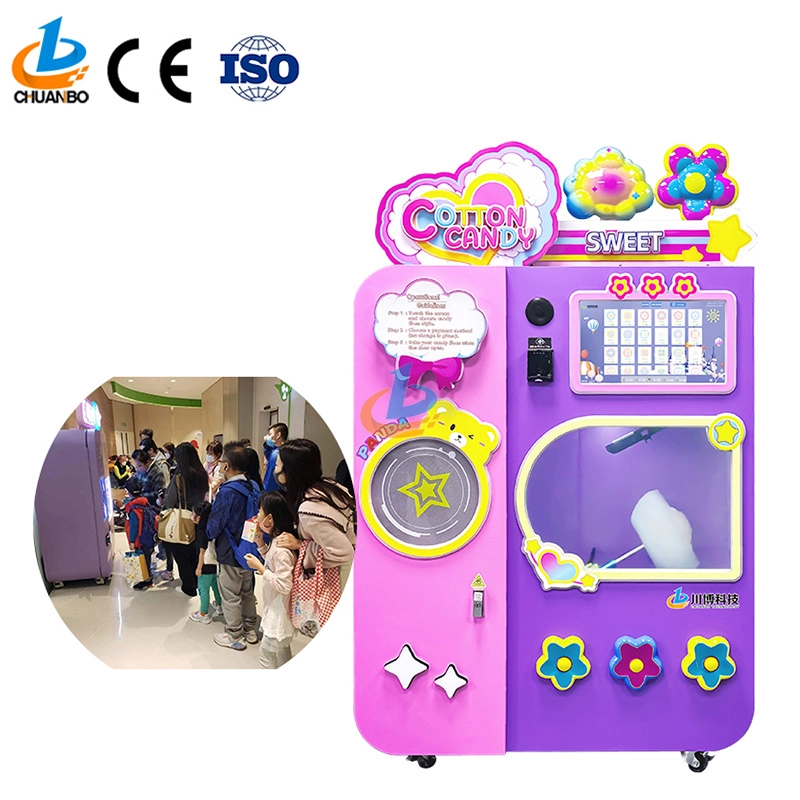
Wholesale Automatic Cotton Candy Vending Machine CB525H
This automatic cotton candy vending machine combines advanced automation technology with the timeless appeal of cotton candy. Its robotic arms precisely transform sugar into fluffy treats and mold them into delightful shapes, such as flowers, hearts, and more. Customers can select the cotton candy they want by their preferences, ensuring that each dessert is both delicious and visually appealing.
Copyright © 2024 CHUANBO All Rights Reserved.

 Scan QR Code
Guangzhou Chuanbo Information Technology Co., Ltd.
chuanbotechnology
Chuanbo Technology
cottoncandymachine9
Chuanbo Technology