
Integrating Payment and Kiosk Systems with SMJ-552 Booth
- Integrating Payment and Kiosk Systems with SMJ-552 Booth
- Overview: why integrate payments into your photo booth machine?
- Key payment methods to support on the SMJ-552 photo booth machine
- Hardware components required for robust payment integration
- Software and platform choices: kiosk OS, POS integrations, and SDKs
- Security and compliance: protecting payments and user data
- User experience (UX) best practices for kiosk payment flows
- Operational considerations: connectivity, maintenance, and uptime
- Measuring success: analytics, reporting, and ROI
- Quick comparison: common payment options for SMJ-552
- Brand advantages when choosing the SMJ-552 for integrated payments
- Deployment checklist: preparing the SMJ-552 for payments
- FAQ — Integration and operations for SMJ-552
- Q: Can the SMJ-552 accept contactless payments like Apple Pay?
- Q: Is it possible to sell multiple packages or upsells at the booth?
- Q: What happens if the network goes down during a transaction?
- Q: How do I ensure PCI compliance for an unattended photo booth machine?
- Q: Can I collect email addresses for digital deliveries and marketing?
- Contact us / View product
- References and authoritative sources
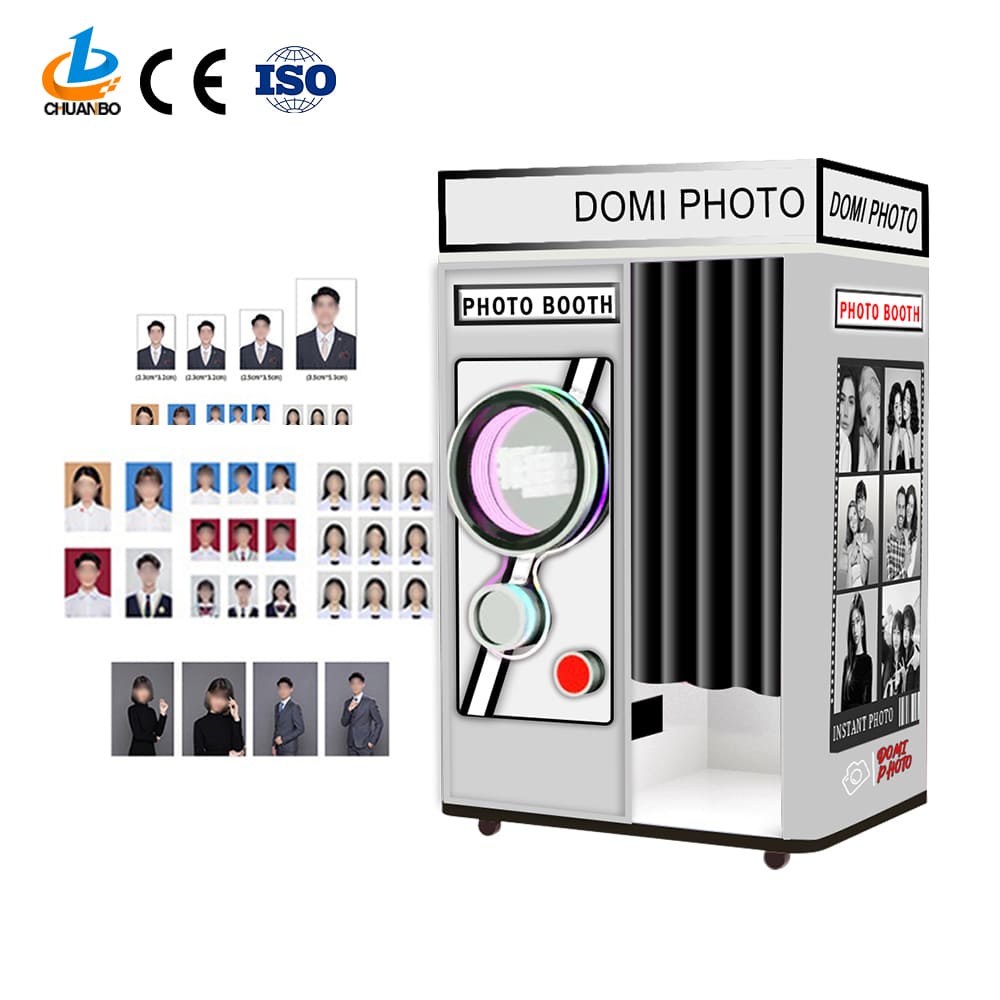
Integrating Payment and Kiosk Systems with SMJ-552 Booth
Overview: why integrate payments into your photo booth machine?
The Automatic Self-Service Photo Booth SMJ-552 is a selfie station that offers a completely digital, self-service photo booth experience, perfect for parties and brand events. It eliminates the need for a photo booth attendant and is easy to use.
Adding payment and kiosk capabilities to a photo booth machine such as the SMJ-552 turns a simple capture device into a revenue-generating, unattended retail touchpoint. Integration lets guests pay for prints, digital packages, branded add-ons, and marketing opt-ins directly at the booth—reducing staffing costs, improving throughput at busy events, and increasing impulse purchases.
Key payment methods to support on the SMJ-552 photo booth machine
When selecting payment methods for an Automatic Self-Service Photo Booth SMJ-552, prioritize widely accepted and secure options that match your audience and venue. The most common approaches are:
- Contactless (NFC) and mobile wallets — Apple Pay, Google Pay, Samsung Pay: fast, secure, and familiar to most users.
- EMV chip and magnetic stripe cards — physical card acceptance for customers without mobile wallets.
- QR code payments and closed-loop vouchers — useful for event promoters, sponsorships, or cashless festivals.
- Cash (optional) — sometimes required for public spaces but adds hardware and security complexity.
Supporting multiple methods increases conversions. For most SMJ-552 deployments, combining contactless + EMV + QR provides the best balance of speed, security, and user familiarity.
Hardware components required for robust payment integration
To accept payments directly at the SMJ-552, you'll typically integrate one or more of the following hardware components:
- Card reader / PIN pad (EMV & contactless) — compact, rugged readers that support PCI-compliant encryption.
- NFC module — often built into the card reader for mobile wallet tap-to-pay.
- Receipt/label printer — for printed receipts, vouchers, or branded photo labels.
- Barcode/QR scanner — to read mobile payment QR codes or event vouchers.
- Connectivity module — cellular (4G/5G) or Ethernet/Wi‑Fi router to ensure reliable transaction processing.
Choose hardware that is compact and can be mounted or housed within the SMJ-552 frame to preserve the booth’s clean, unattended design.
Software and platform choices: kiosk OS, POS integrations, and SDKs
Integrating payments requires both front-end kiosk software and back-end payment processing. Consider these software layers:
- Kiosk application — the UI on SMJ-552 that presents packages, upsells, and payment screens. It should support full-screen secure payment flows and be easily customizable for branding.
- Payment gateway / processor — a PCI-compliant service (Stripe, Adyen, Square, etc.) that handles card authorization and settlement.
- Hardware SDKs and APIs — card reader manufacturers provide SDKs to process EMV/contactless transactions and handle encryption.
- POS / backend integration — for inventory, reporting, and reconciliation. Integrations can be simple CSV exports or real-time API connections to your accounting or event-management platforms.
Choose platforms with strong kiosk and unattended-device support (offline-mode handling, secure key injection, and robust logging).
Security and compliance: protecting payments and user data
Security is non-negotiable when handling cardholder data at an unattended photo booth machine. Key considerations include:
- PCI DSS compliance: Ensure the payment solution and hardware provider support point-to-point encryption (P2PE) and have clear guidance for unattended kiosks.
- EMV and tokenization: Use EMV-capable readers and tokenized payment flows so raw card data never touches your kiosk application.
- Network security: Use secure TLS connections, VLANs or VPNs for card traffic, and isolate payment devices from other booth systems.
- Privacy: If you capture email addresses or social shares, be transparent with consent and store data according to local privacy laws (GDPR, CCPA where applicable).
Work with your payment processor and hardware vendor to complete necessary attestations and security checks before deployment.
User experience (UX) best practices for kiosk payment flows
A smooth UX significantly increases completed transactions on the SMJ-552. Keep in mind:
- Clear pricing and options: Display packages with thumbnails, prices, and quick descriptions before the payment step.
- Fast payment initiation: Allow tap-to-pay or scan a QR code early, minimizing typing. For EMV, present clear instructions about card insertion, swipe, or tap.
- Visual & audio feedback: Use on-screen prompts, progress bars, and short sounds to guide users through payment and printing.
- Recovery flows: If a payment fails, provide clear options to retry, choose another method, or contact support—don’t force the user to restart the session.
- Accessibility: Ensure font sizes, contrast, and button sizes are friendly for all users; support multiple languages if events are international.
Operational considerations: connectivity, maintenance, and uptime
Unattended kiosks must operate reliably during events. Plan for:
- Redundant connectivity: Use primary wired or venue Wi‑Fi and a cellular backup to handle payments when networks fluctuate.
- Remote monitoring: Central dashboards to monitor transactions, printer status, and device health in real time.
- Consumables and physical maintenance: Track photo paper, ink/labels, and power stability. Schedule quick service swaps or have spare units on site for high-volume events.
- Security of physical devices: Secure mounting, locks, and tamper sensors to prevent theft or tampering at public venues.
Measuring success: analytics, reporting, and ROI
To evaluate the financial impact of integrating payments into the SMJ-552, track KPIs such as:
- Transactions per hour
- Average order value (AOV)
- Conversion rate (sessions that purchase vs sessions started)
- Upsell attach rate (percentage of customers who buy add-ons)
- Operational uptime and service calls
Combine transaction data from your payment processor with booth analytics (session starts, selected templates) to understand customer behavior and optimize pricing and offers.
Quick comparison: common payment options for SMJ-552
| Payment Method | Pros | Cons | Best Use Case |
|---|---|---|---|
| Contactless (NFC / Mobile Wallet) | Fast, secure, high conversion | Requires modern phones; occasional compatibility issues | Quick event checkouts, festivals |
| EMV Chip Cards | Widespread acceptance, secure | Slower than tap; requires EMV-capable reader | General public venues |
| QR / Mobile Scan | No hardware needed on kiosk; flexible offers | Slower onboarding, requires user familiarity | Promoted experiences, sponsor codes |
| Cash | Accessible to all | Security, change management, theft risk | High-traffic public sites where cash remains common |
Brand advantages when choosing the SMJ-552 for integrated payments
The Automatic Self-Service Photo Booth SMJ-552 is designed for unattended operation and easy customization, which makes it well-suited for payment and kiosk integration. Brand advantages include:
- Attendant-free design: Reduces labor costs and simplifies deployment across many event types.
- Modular architecture: The SMJ-552 supports embedded peripherals and SDK integrations for card readers, printers, and scanners.
- Optimized UX for self-service: Intuitive touch flows increase completion rates and customer satisfaction.
- Scalable deployment: From single-event rentals to multi-venue installations, SMJ-552 can scale with centralized management tools.
Deployment checklist: preparing the SMJ-552 for payments
Before going live, confirm these items:
- Payment hardware is PCI-compliant and integrated via supported SDKs.
- Network plans include primary and backup connectivity.
- Clear on-screen instructions and recovery flows are tested.
- Remote monitoring is configured and staffed.
- Consumables (paper/ink) and spares are on-site for the event duration.
- Legal: receipts, privacy policy, and refund process are documented.
FAQ — Integration and operations for SMJ-552
Q: Can the SMJ-552 accept contactless payments like Apple Pay?
A: Yes. When equipped with an NFC-enabled card reader and integrated with a supporting payment processor, the SMJ-552 can accept Apple Pay, Google Pay, and other tokenized mobile wallet transactions securely.
Q: Is it possible to sell multiple packages or upsells at the booth?
A: Absolutely. The kiosk UI can present tiered packages (digital-only, prints + digital, branded frames, props) and upsell options prior to checkout. Tracking attach rates helps optimize offers.
Q: What happens if the network goes down during a transaction?
A: Good implementations include a cellular backup and offline-authorize modes where available. If a transaction cannot be completed, the kiosk should offer retry, alternate payment options, or a prompt to contact support.
Q: How do I ensure PCI compliance for an unattended photo booth machine?
A: Use P2PE-certified hardware, tokenization, and a payment gateway that supports unattended kiosks. Work with your payment processor to complete the necessary SAQ or attestation forms.
Q: Can I collect email addresses for digital deliveries and marketing?
A: Yes—collecting emails for photo delivery or opt-in marketing is common. Make sure you display consent, comply with privacy laws, and secure stored data.
Contact us / View product
If you’re ready to add secure payments to your Automatic Self-Service Photo Booth SMJ-552 or want a demo of integrated kiosk workflows, contact our sales team or visit the product page. We'll help you choose payment hardware, set up secure processing, and optimize the booth UX for your event or venue.
References and authoritative sources
Troubleshooting Common Cotton Candy Machine Problems
OEM/ODM cotton candy vending machine philippines Manufacturers and Suppliers
Where Can I Buy a Selfie Photo Booth? Discover with Chuanbo
How Much Does a Cotton Candy Vending Machine Business Cost in Russia? - Chuanbo
About customized services
How long does customization take?
The time for customization will vary depending on the complexity of the project. Generally, the production cycle is 4 to 6 weeks after the plan is confirmed.
Can you provide personalized customization services?
Yes, we can provide personalized, customized services according to your needs and requirements, including product logo, appearance, etc.
How is the customization fee calculated?
The customization fee is evaluated based on factors such as design complexity, material selection, and production scale. We will provide a detailed quotation after demand communication.
How to deal with the transportation and installation of customized products?
We will arrange transportation according to customer needs to ensure that the product arrives safely at the designated location. At the same time, we provide professional video installation and commissioning services to ensure that the equipment is put into use smoothly.
About the company
What are the company's main advantages?
International Standardization: The company’s products meet international standards with continuously updated technology to ensure machine stability and performance.
Strong R&D Team: Offers customization services, can interface with third-party software, and achieve custom software development and integration for clients.
Quality Service: The warranty will be 3 years for the main board and 2 years for the power supply; others are one-year warranties. If any parts are defective during the warranty without any human damage, you don't need to repair it; we can offer you a new part to exchange.
Full Function Optimization and Upgrade: Offers free updates and upgrades, supports remote backend operations, and marketing coupon functionalities.
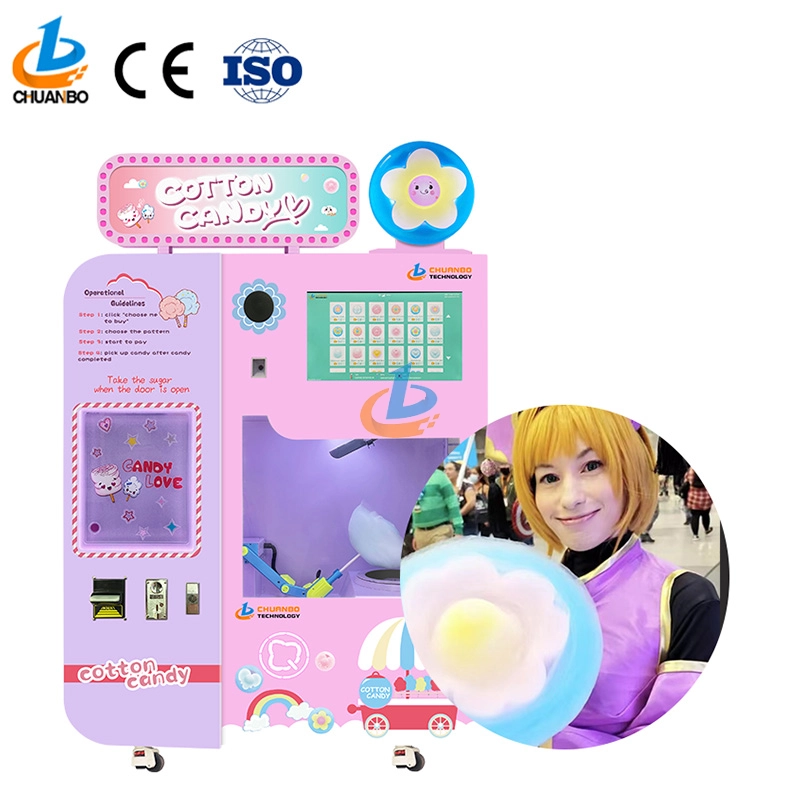
Fully Automatic Cotton Candy Vending Machine CB328
Introducing the Chuanbo Fully Automatic Cotton Candy Vending Machine CB328—a perfect blend of innovation and convenience. Ideal for businesses, this vending machine offers an effortless way to enjoy fresh cotton candy anytime. Explore the automatic cotton candy vending machine for sale and elevate your location's snack options today.
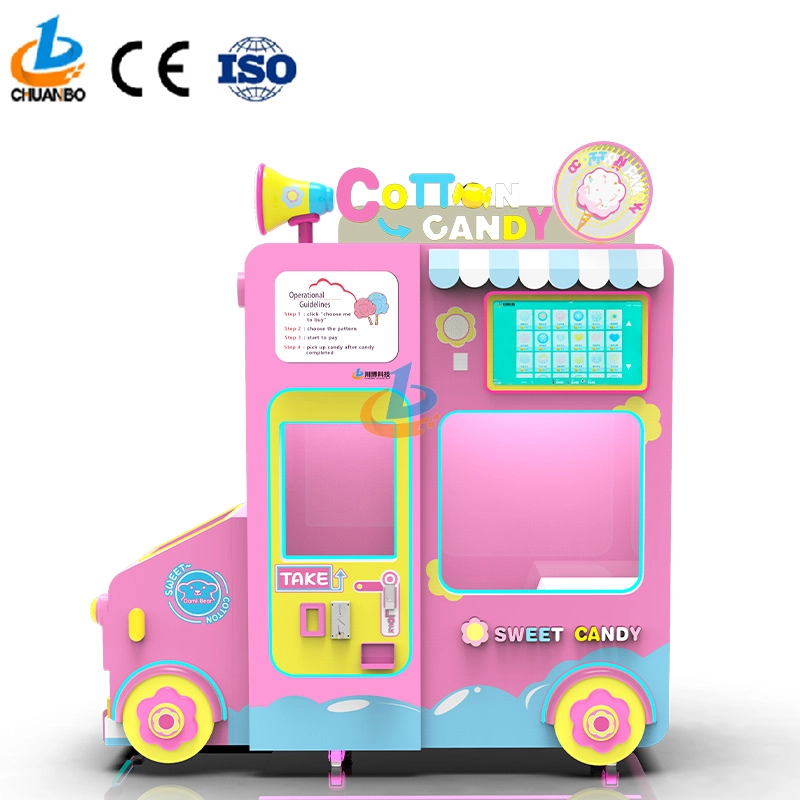
Intelligent Flower Candy Floss Vending Machine CB730
This automated candy floss vending machine combines advanced automation technology with the timeless appeal of cotton candy. Its robotic arms precisely transform sugar into fluffy treats and mold them into delightful shapes, such as flowers, hearts, and more. Customers can select the cotton candy they want by their preferences, ensuring that each dessert is both delicious and visually appealing.
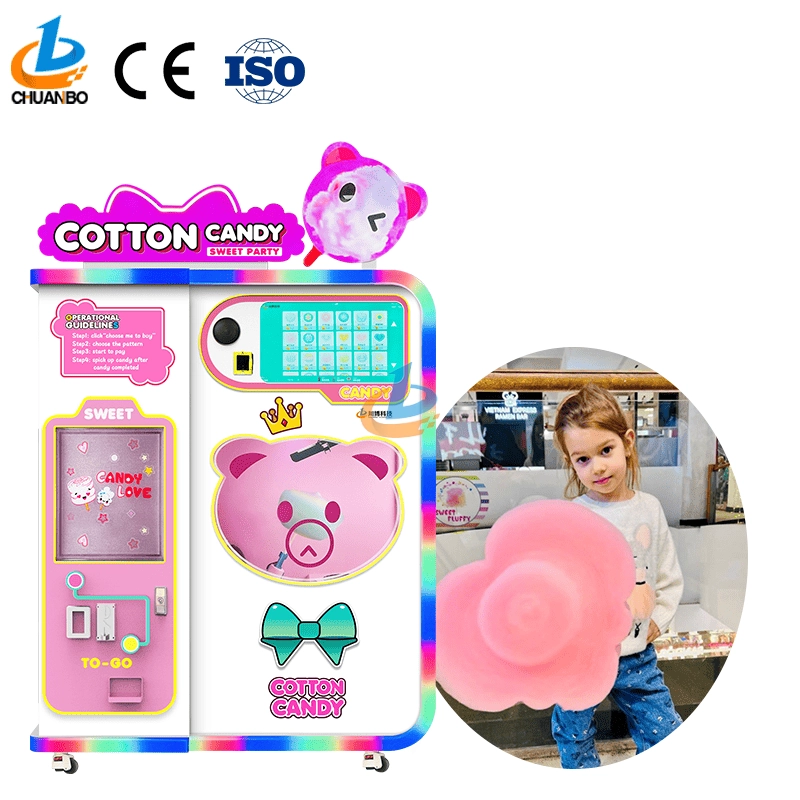
Fully Automatic Cotton Candy Vending Machine CB525
Discover the Chuanbo Fully Automatic Cotton Candy Vending Machine CB525, the ultimate solution for hassle-free confectionery delight. Ideal for entrepreneurs and venues, this high-efficiency machine ensures consistent quality. Explore our fully automatic cotton candy vending machine for sale today and elevate your business offerings.
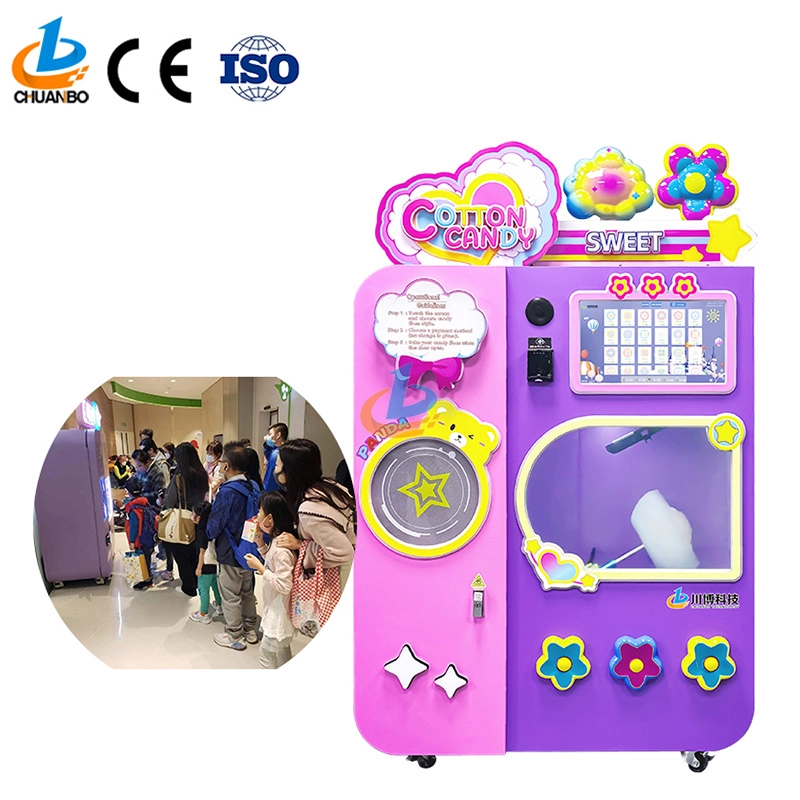
Wholesale Automatic Cotton Candy Vending Machine CB525H
This automatic cotton candy vending machine combines advanced automation technology with the timeless appeal of cotton candy. Its robotic arms precisely transform sugar into fluffy treats and mold them into delightful shapes, such as flowers, hearts, and more. Customers can select the cotton candy they want by their preferences, ensuring that each dessert is both delicious and visually appealing.
Copyright © 2024 CHUANBO All Rights Reserved.

 Scan QR Code
Guangzhou Chuanbo Information Technology Co., Ltd.
chuanbotechnology
Chuanbo Technology
cottoncandymachine9
Chuanbo Technology